All-around Outlook servicing solution
Stellar Toolkit for Outlook is a powerful utility platform designed to help users and administrators address most issues with Microsoft Outlook. This is a 7-in-1 tool that covers repairing Outlook files, converting between file types, and generally optimizing your mailbox performance. With its capability to handle large files, organizations can use it to seamlessly repair damaged files or migrate to other platforms, such as Live Exchange and Office 365.
Stellar Toolkit for Outlook is the complete solution for Outlook file management, including mailbox merging and email undelete capabilities. You can also check out Stellar Repair For Outlook or Stellar Repair for Outlook Technician.
Advanced repair and restoration solution for Outlook
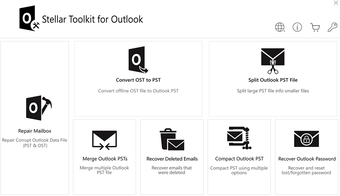
As mentioned, Stellar Toolkit for Outlook consolidates multiple tools into one platform. This streamlines the restoration, migration, and management of your Outlook platform. From recovering corrupted OST and PST content to finding lost Outlook passwords, below are the parts of the 7-in-1 toolkit:
- Stellar Repair for Outlook Technician: Repairs corrupt PST files and recovers mailbox content.
- Stellar Converter for OST Technician: Converts inaccessible OST files into PST files.
- Stellar Splitter for Outlook: Specialized tool for splitting massive PST files into smaller, more manageable segments depending on user-defined parameters.
- Stellar Compactor for Outlook: For scenarios where splitting files isn’t advisable, you can compact a large PST file. This separates attachments into an interlinked directory, optimizing the mailbox file.
- Stellar Merge Mailbox for Outlook: Combine multiple PST files into a larger, single file.
- Stellar Undelete Email for Outlook: Recover deleted files from any Outlook mailbox.
- Stellar Password Recovery for Outlook: Specialized tool for recovering lost or forgotten MS Outlook accounts.
Regardless of the tool used, the toolkit provides versatile support for all existing versions of Outlook, from Microsoft Outlook 2019 to the older versions. Additionally, the toolkit also comes with zero file size restrictions. You can scan, preview, and process—although larger files take longer to process. This alone makes this a largely helpful tool for large organizations with many users and long usage histories. Similarly, repair and conversion features support a wide range of output file types.
Powerful tools with user-friendly interfaces
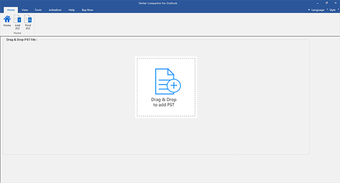
With Stellar Toolkit for Outlook, you can access all seven tools from a centralized dashboard. Each of the specialized tools requires a couple of clicks to set up, starting with locating and loading the target Outlook file. Also, Stellar Converter for OST and Stellar Repair for Outlook both come with an enhanced preview showing your complete mailbox data. These previews even include body text and embedded hyperlinks on top of your calendars, contacts, and journals.
To better control your recovery and conversion processes, you can set up Advanced Filters to include or exclude mailbox items depending on various parameters. You can choose from Outlook folders such as Junk and Deleted items, accounts, email addresses, and date range. Additionally, you can save and load previous scan data—letting you pause your conversion or recovery projects and pick up where you left off.
The 7-in-1 toolkit also offers a Free Trial, letting you use most tools for scanning your OST and PST files. Depending on the tool, you can even check the preview and see the files detected by your chosen tool. However, to proceed with any of the features, you’ll need to avail of either a 1-Year License or a Lifetime License.
All your Outlook needs in one place
The Stellar Toolkit for Outlook offers a comprehensive solution by integrating seven powerful tools into one platform—streamlining the restoration, migration, and management of Outlook data. It supports all Outlook versions and handles files of any size, making it ideal for large organizations. With user-friendly interfaces and advanced filtering options, it ensures efficient recovery and conversion processes. The toolkit's Free Trial allows users to test its features before committing to a license.